
A look inside Tidal Shift for councils — the real platform, loaded with a worked example. You’re not signed in and there’s nothing to set up — just scroll at your own pace. Not a carrier? See the carriers tour.
Guided tour
A corridor from a council's perspective
Welcome to this guided mini-tour of Tidal Shift, a neutral reverse logistics coordination and chain-of-custody platform for hard-to-move materials. This will run you through some of its main features and where to find them once you're set up.
- Illustrated with
- 6 demonstration councils
- Corridor
- Alice Springs → Darwin
- Stops
- 7
- Time needed
- 10-15 minutes
Before you start
The screenshots below come from a demonstration corridor — six fictional councils on the real Stuart Highway, with a receiver in Darwin.
There is nothing to set up and nothing to click through to — just read and absorb as you go. Each stop names the feature it comes from, so you can see how the parts fit together.
Stop 01
Your dashboard
DashboardYour listed loads at every stage, in four headline numbers — plus a short “getting started” list to help you get set up. Each step shows you the corresponding part of the platform.
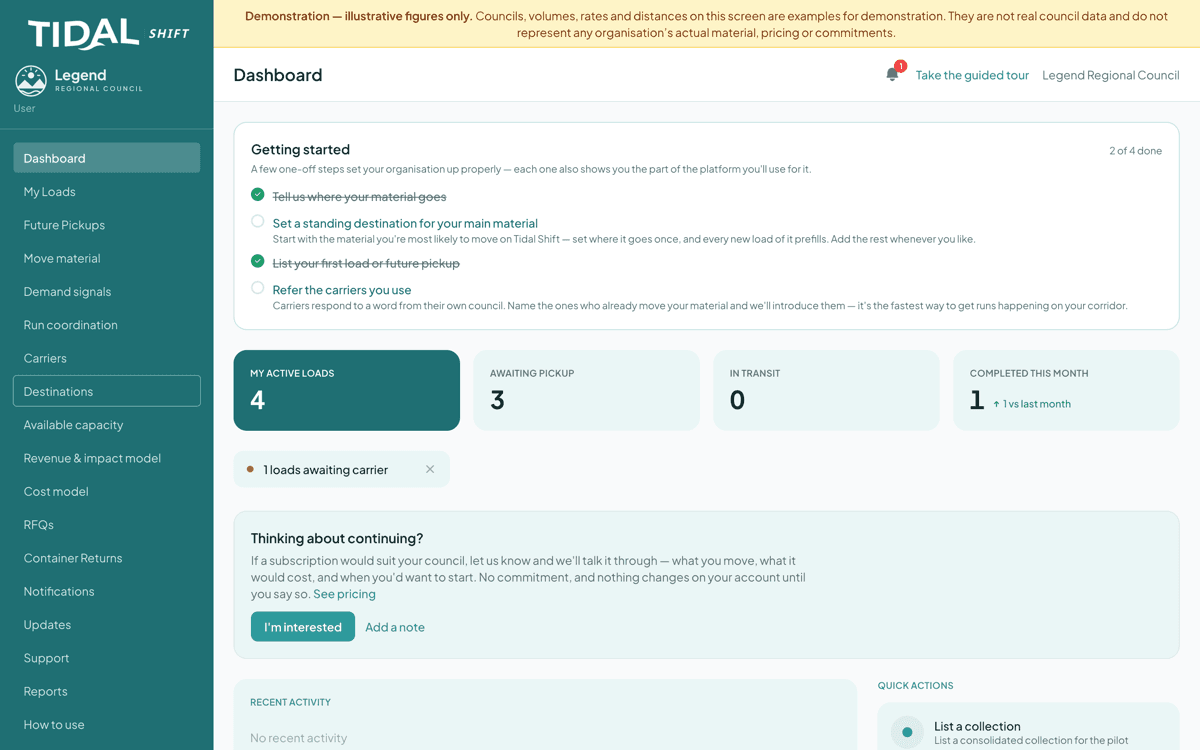
“Awaiting pickup” is material still sitting in the yard. Look at
- Getting started — derived from your actual data, not a checklist you tick
- Awaiting pickup
- Completed this month, against last month
What this means
Most councils know roughly what's in the yard, but not what it costs to leave it there.
Stop 02
Two ways to start moving materials
Move material1) List a load when the material is ready and you know where it needs to go. Carriers who run your corridor and take your material see it first. You choose the one you want, then settle the rate with them on the platform — accept, counter, or decline — and once you agree, it is recorded on the load and remembered for your next load on that corridor. 2) When you have materials to move but they are short of a full load, you can send a demand signal, signalling to neighbouring councils that you would like to pool loads for more cost-effective transport.
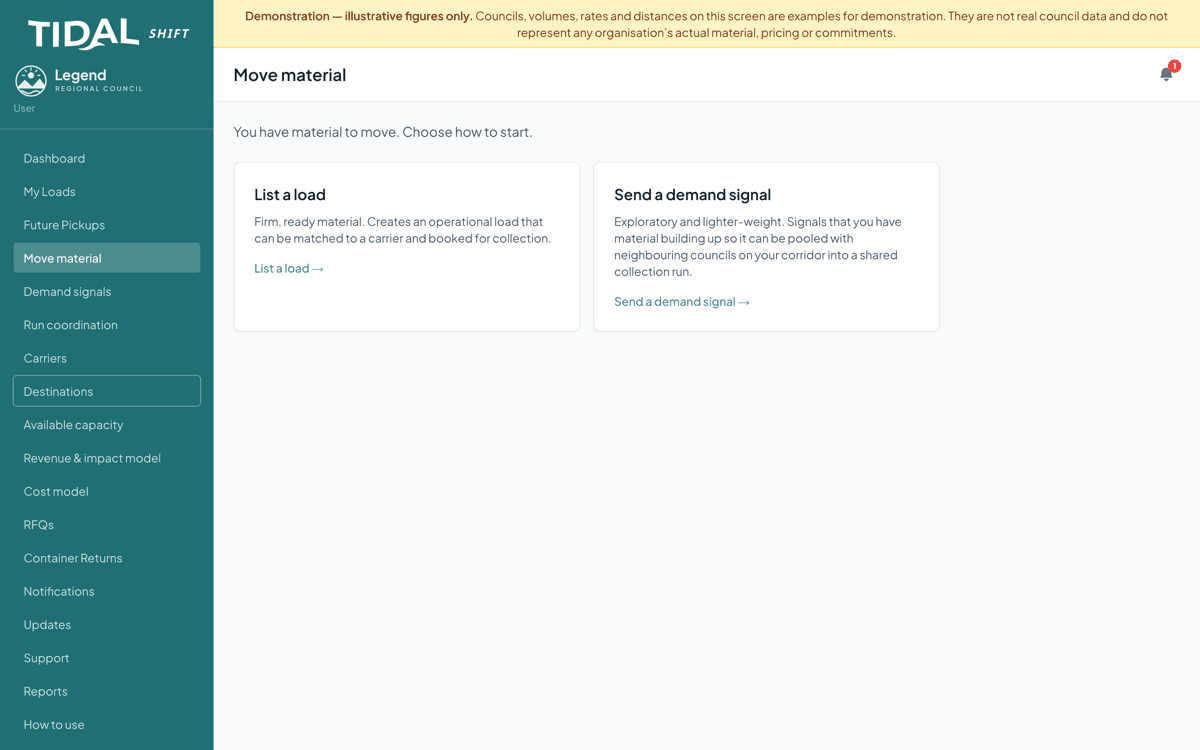
Most councils pick the left-hand option; the right-hand one — the demand signal — is often more useful. Look at
- A signal is lightweight and non-committal — it is not a booking
- It can be pooled with neighbouring councils
- You can convert a signal into a real load later
What this means
Waiting until material is “ready” keeps each council's pile below a truckload. Flagging it early is what lets several piles combine into one run.
Stop 03
Your tonnes, and everyone else's
Demand signalsSix councils on one highway, 27 tonnes of tyres between them. Each council said what it had, and the platform assembled the run — without anyone making a call.
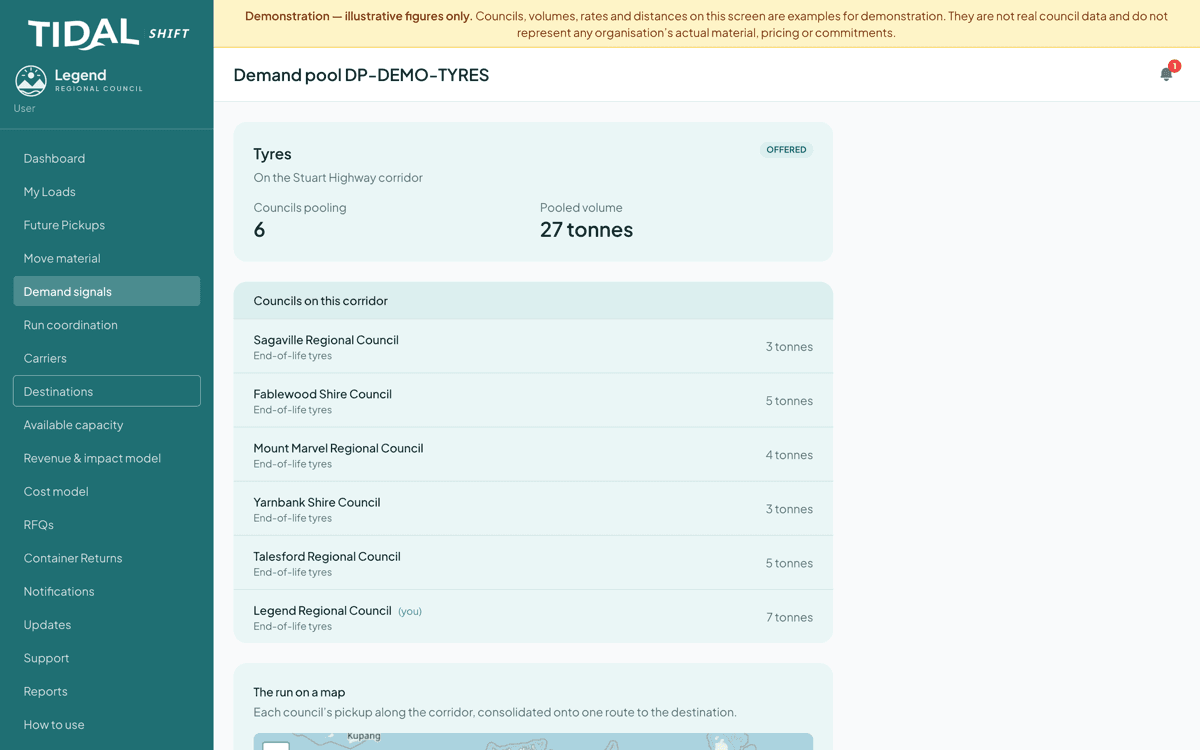
Six councils, 27 tonnes. On its own, no single council's share is a truckload. Look at
- Each council's contribution, and where you sit in it
- The map: each pickup in corridor order
- The pool's state — gathering, offered, or accepted
What this means
Three tonnes of tyres in one town won't justify a truck. Twenty-seven along one road will.
Stop 04
A run that already has a price on it
Run coordinationThe carrier has quoted. You see the whole run — every council, every pickup, in corridor order — and you accept it or you do not.
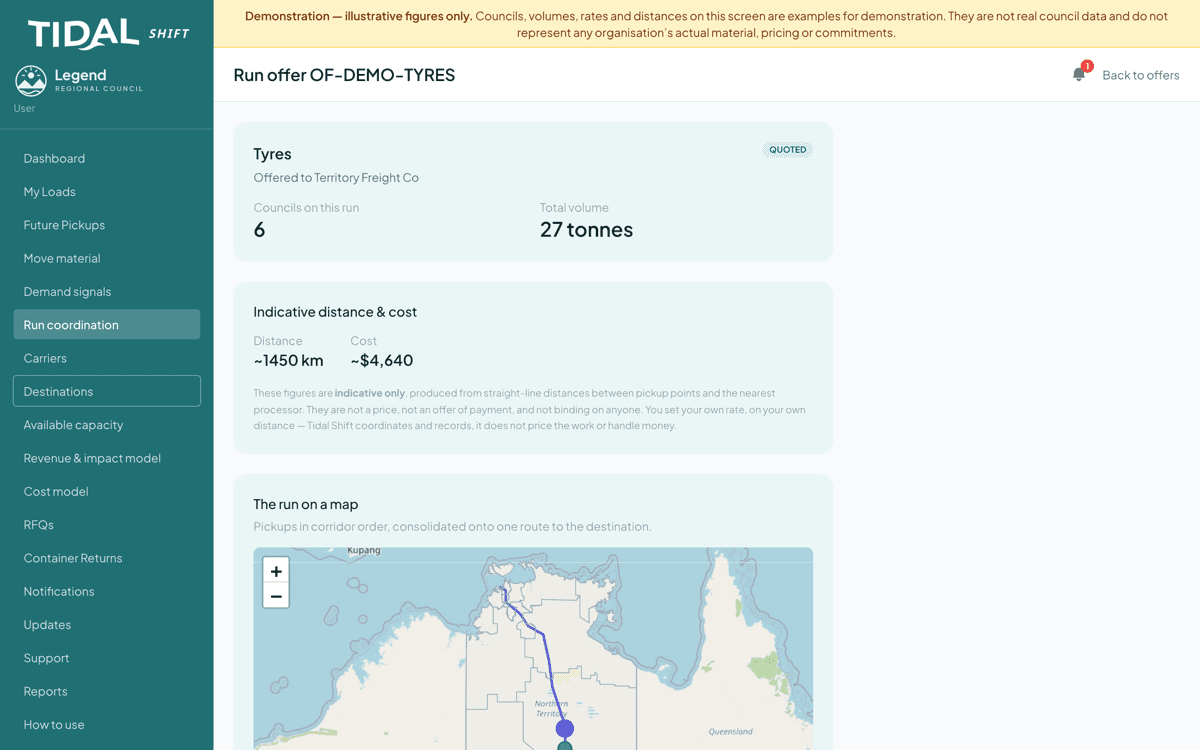
The paragraph under the figures sets out the commercial position. Look at
- The carrier marked Licensed — checkable, not asserted
- Pickups in corridor order, so you can see the truck's day
- Indicative distance and cost — not a price
What this means
Tidal Shift is not a party to this contract and takes no margin on it. The rate is whatever you and the carrier agree; the platform records it so both sides see the same version.
Stop 05
Somebody else's empty truck
Available capacityA carrier driving back with empty space can post it. Councils on the corridor are notified and offer material in before the window closes.
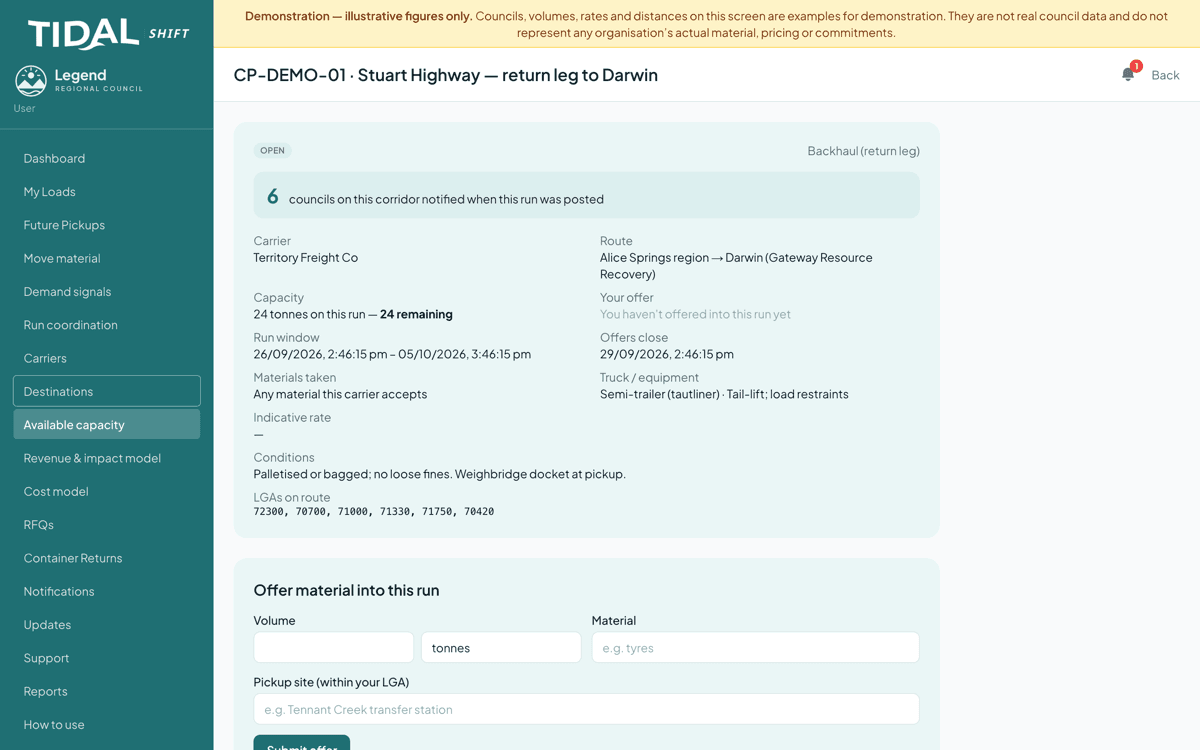
A return leg filling up. The bar is the truck; the segments are councils that have pledged in. Look at
- Pledged against capacity, and what is left
- The offers-close date — a window, not a standing service
- The carrier's conditions, attached to the posting
What this means
The run was happening anyway. The cheapest freight on your corridor is the leg somebody is already driving.
Stop 06
View the carrier's profile before you list material to them
CarriersThe runs they already make, what they will and won't take, how they need it presented, and their conditions of carriage. They write it once; every council on the corridor can read it. Filter to carriers who run your area and take your material, and see each one's indicative rate where they've recorded it.
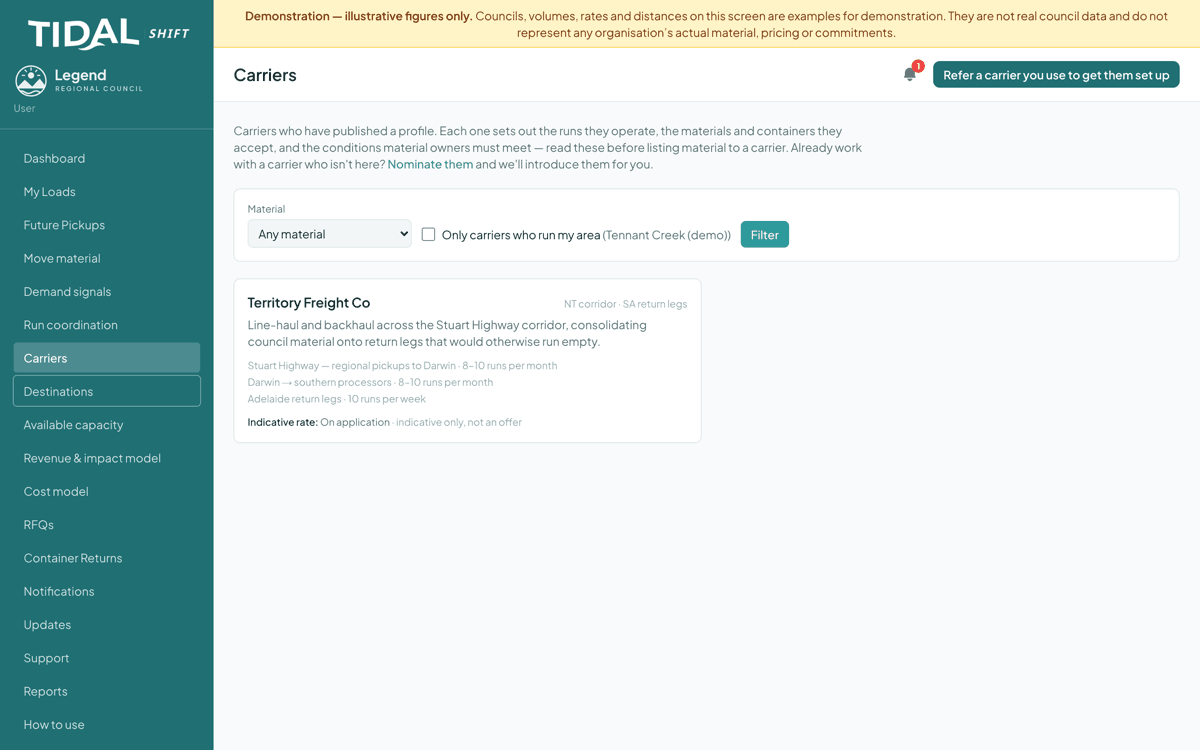
How often they run, and how much they can take — the two things that decide whether your material fits. Look at
- Filter to carriers who run your area and carry your material
- How often they run, materials, containers, and who loads
- Indicative rate where recorded — and conditions of carriage, published and versioned
What this means
Most failed collections are a mismatch nobody checked: unpalletised material, a container the truck cannot take, a cut-off already passed.
Stop 07
Quality control on every movement
My LoadsEvery movement is counted and photographed at pickup, counted and photographed again at delivery, and the two ends reconciled. The record builds itself as the job is done, so what you hold afterwards is verification rather than paperwork.
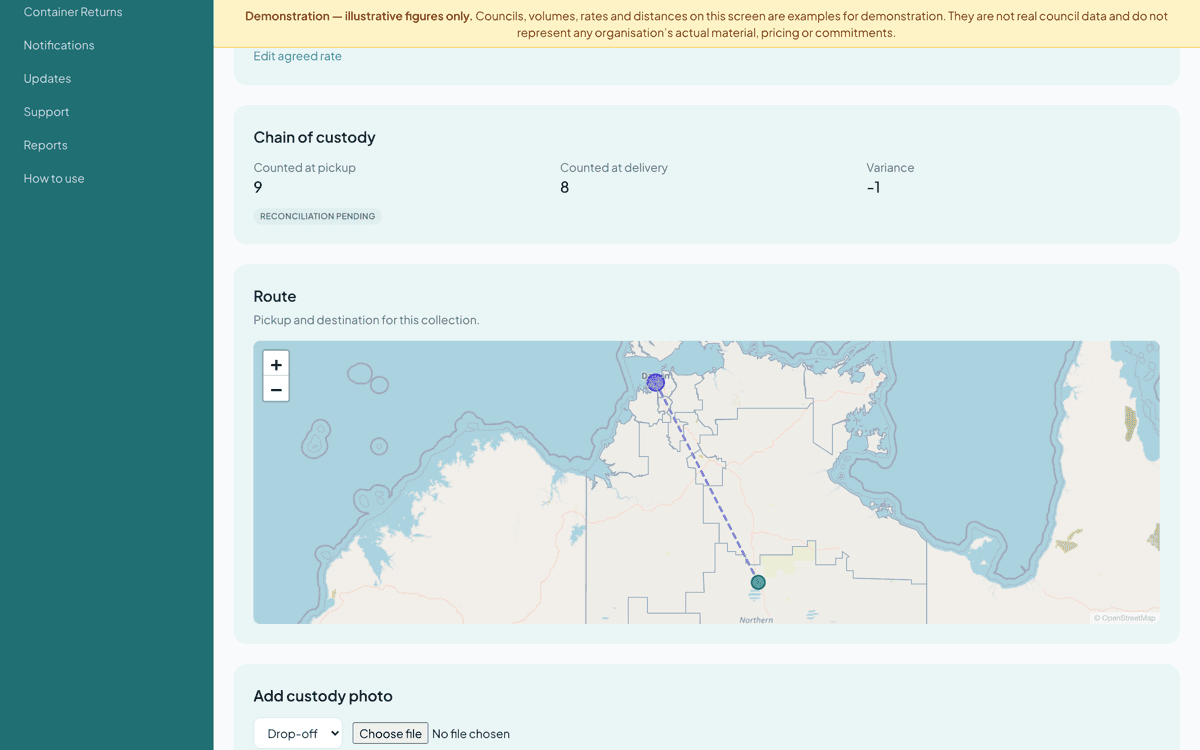
Counts at both ends, reconciled. Here they differ by one, so the load stays open until that is resolved. Look at
- Counts at pickup and at delivery, side by side
- Anything that does not reconcile stays flagged rather than closing quietly
- Custody photos and a message thread on the same record
What this means
Verification of where your material went, produced as a byproduct of moving it — no separate spreadsheet, and nothing to chase after the fact.
What else is in there
The 7 stops are the shape of it. These are the features that fill in around them.
- Future Pickups
- Material you have flagged as coming, so carriers can build a run around it.
- Destinations
- Where each material normally goes, set once so every new load prefills it.
- Reports
- Your operating history, and a regulator waste-tracking export.
- Container returns
- Reusable containers that went out with a load and have not all come back.
- Cost model
- What a material stream costs you to move — your own planning figure.
- Run coordination
- Every offer across your pools, in one place, with its current state.
What Tidal Shift does not do
It never touches your money
Tidal Shift is not a party to your contract with a carrier or processor. It does not set rates, take a margin on freight, or move payments. Every figure shown is indicative.
It does not certify anyone
Licences shown are records held and checked against, not a warranty that a carrier or processor is compliant. Keeping them current is the holder's responsibility.
It does not take your material off your hands
You keep your own carriers, rates and relationships. The platform coordinates and records — it does not become the operator.
Ready to see your own corridor?
Tell us what you move, where it starts and where it needs to go, and we’ll get you set up.